레이블이 Automate Build인 게시물을 표시합니다. 모든 게시물 표시

2018년 9월 10일 월요일

[Automate Build] 6. Fix My Build.xml (Apache Ant)


At the previous blog, I got error message ' "SomeDirectory/clz" not found'.
My build.xml is working well at Eclipse but, it is not enough to run in Jenkins.
<?xml version="1.0" encoding="UTF-8"?>
<project name="TestSample">

    <!-- set system properties -->
    <property name="home" value=".." />
    <property name="java6.home" value="C:/Program Files/Java/jdk1.6.0_45" />
    
    <!-- set proeject path properties -->
    <property name="project_01" value="${home}/project_01" />
    <property name="project_02" value="${home}/project_02" />
    
    <!-- set library path properties -->
    <property name="lib_01" value="${someProject}/lib/lib_01" />
    <property name="lib_01" value="${someProject}/lib/lib_02" />

    <!-- set build target -->
    <target name="Build All Group" depends="Group_01, Group_02" />
    <target name="Group_01" depends="build_project_01" />
    <target name="Group_02" depends="build_project_02" />

    <target name="build_project_01">
        <delete dir="${someProject}">
            <include name="project_01.jar" />
        </delete>
        <jar destfile="${someProject}/build_project_01.jar" basedir="${project_01}/clz" />
    </target>

    <target name="build_project_02">
        <delete dir="${someProject}">
            <include name="project_02.jar" />
        </delete>
        <jar destfile="${someProject}/build_project_02.jar" basedir="${project_02}/clz" />
    </target>

</project>


I will modify to compile with keeping original structure.
(This series' purpose is introduce auto-building system with little learning curve to my co-workers)

First, I need to make directory 'clz' instead of Eclipse.
<target name="build_project_01">

    <!-- add mkdir -->
    <delete dir="${project_01}/clz"/>
    <mkdir dir="${project_01}/clz"/>
</target>


Adding compile command.
<property name="java6.javac" location="${java6.home}/bin/javac"/>

<target name="build_project_01">
    
    <!-- add javac for compile -->
    <javac executable="${java6.javac}" fork="yes" includeantruntime="false" encoding="UTF-8"
            debug="true" debuglevel="lines,vars,source" srcdir="${project_01}/src" destdir="${project_01}/clz">
        <classpath>
            <fileset dir="${lib_01}" includes="*.jar"/>
            <fileset dir="${lib_02}" includes="*.jar"/>
        </classpath>
    </javac>

</target>


Copy files witout '.java' such as '.hbm', '.jpg' and '.js'
<target name="build_project_01">

    <!-- add copy command -->
    <copydir src="${project_01}/src" dest="${project_01}/clz" excludes="**/*.java"/>

</target>


Finally, change java.home to run build.xml in Jenkins.

<!-- java6.home path for using in eclipse -->
<!-- property name="java6.home" value="C:/Program Files/Java/jdk1.6.0_45" /-->

<!-- java6.home path for using in Jenkins -->
<property name="java6.home" value="${java.home}/.." />

<property name="java6.javac" location="${java6.home}/bin/javac"/>


This is full sample build.xml file in my case
Actual my build.xml is longer than this, but basically repeating this structure.
<?xml version="1.0" encoding="UTF-8"?>
<project name="TestSample">

    <!-- set system properties -->
    <property name="home" value=".." />
    <property name="java6.home" value="C:/Program Files/Java/jdk1.6.0_45" />
    
    <!-- set proeject path properties -->
    <property name="project_01" value="${home}/project_01" />
    <property name="project_02" value="${home}/project_02" />
    
    <!-- set library path properties -->
    <property name="lib_01" value="${someProject}/lib/lib_01" />
    <property name="lib_01" value="${someProject}/lib/lib_02" />

    <!-- set build target -->
    <target name="Build All Group" depends="Group_01, Group_02" />
    <target name="Group_01" depends="build_project_01" />
    <target name="Group_02" depends="build_project_02" />

    <target name="build_project_01">
        <delete dir="${project_01}/clz"/>
        <mkdir dir="${project_01}/clz"/>

        <javac executable="${java6.javac}" fork="yes" includeantruntime="false" encoding="UTF-8"
                debug="true" debuglevel="lines,vars,source" srcdir="${project_01}/src" destdir="${project_01}/clz">
            <classpath>
                <fileset dir="${lib_01}" includes="*.jar"/>
                <fileset dir="${lib_02}" includes="*.jar"/>
            </classpath>
        </javac>

        <copydir src="${project_01}/src" dest="${project_01}/clz" excludes="**/*.java"/>

        <delete dir="${someProject}">
            <include name="project_01.jar" />
        </delete>
        <jar destfile="${someProject}/build_project_01.jar" basedir="${project_01}/clz" />
    </target>

    <target name="build_project_02">
        <delete dir="${project_02}/clz"/>
        <mkdir dir="${project_02}/clz"/>

        <javac executable="${java6.javac}" fork="yes" includeantruntime="false" encoding="UTF-8"
                debug="true" debuglevel="lines,vars,source" srcdir="${project_02}/src" destdir="${project_02}/clz">
            <classpath>
                <fileset dir="${lib_01}" includes="*.jar"/>
                <fileset dir="${lib_02}" includes="*.jar"/>
            </classpath>
        </javac>

        <copydir src="${project_02}/src" dest="${project_02}/clz" excludes="**/*.java"/>

        <delete dir="${someProject}">
            <include name="project_02.jar" />
        </delete>
        <jar destfile="${someProject}/build_project_02.jar" basedir="${project_02}/clz" />
    </target>

</project>


Set modified build.xml (build_in_jenkins.xml)

It is result running build.xml

Success!!

2018년 8월 7일 화요일

[Automate Build] 5. Create New Item in Jenkins

5. Create New Item in Jenkins

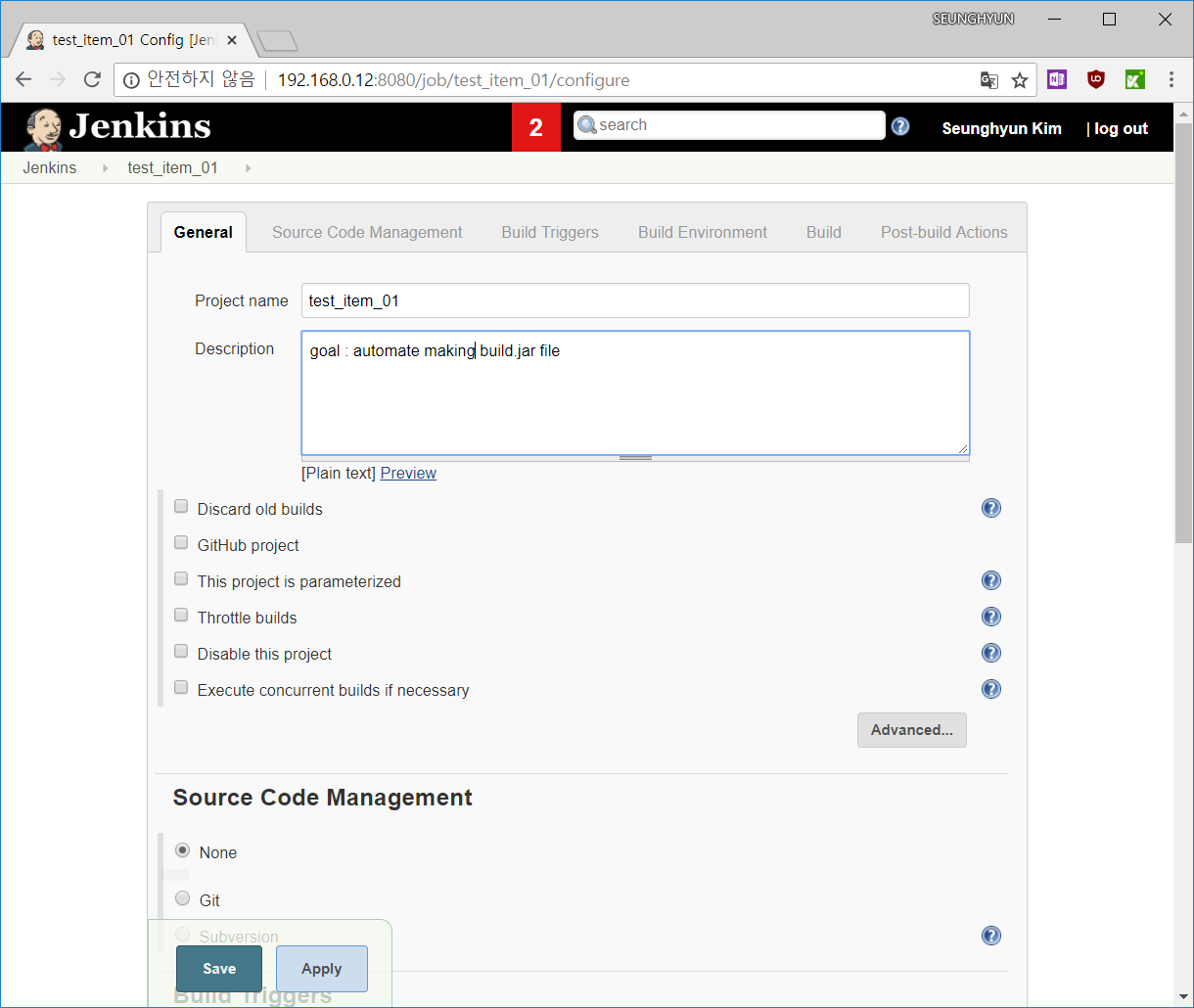
Let's create new item


I don't know well about Jenkins, so I choose 'Freestyle project'.


Fill in some words on blanks.

I want to integrate with SVN server. I must make credentials about svn user


Fill in some words on blanks too.


My company's build tools is Ant, specifically Ant 1.7.0 version and It based on JDK 1.6.0_45


At build tab, I use invoke Ant. Fill in proper values and save


I build this Item manually


It has an error. Go to console output


My build.xml file has a problem. I will fix Build.xml file next.
* I blind somethig that can have problem, but it's not important things to jenkins

2018년 7월 27일 금요일

[Automate Build] 4. Setup Configurations in Jenkins

4. Setup Configurations in Jenkins

I need to setup configurations.
My company's tool has been built by Jdk1.6.0_45 and ant1.7.0.
(I don't like these old versions. However, I don't have authority changing this.)

Go to 'Configuration System'


Select SVN version and save


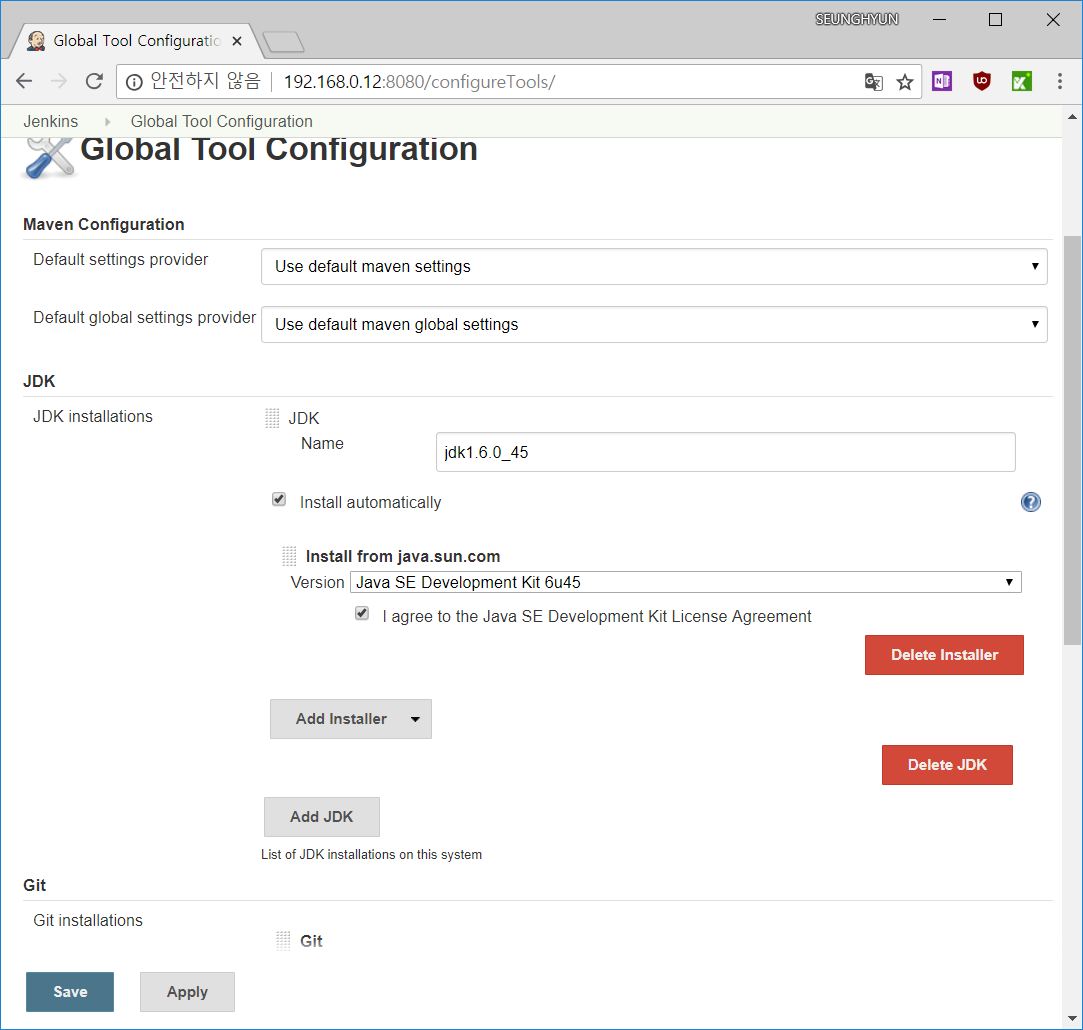
Go to 'Global Tool Configuration'


Fill in the name and select version.
I select jdk1.6.0_45. You can select other proper version for you
For download jdk from oracle click this


Fill in your oracle account informations


Saved


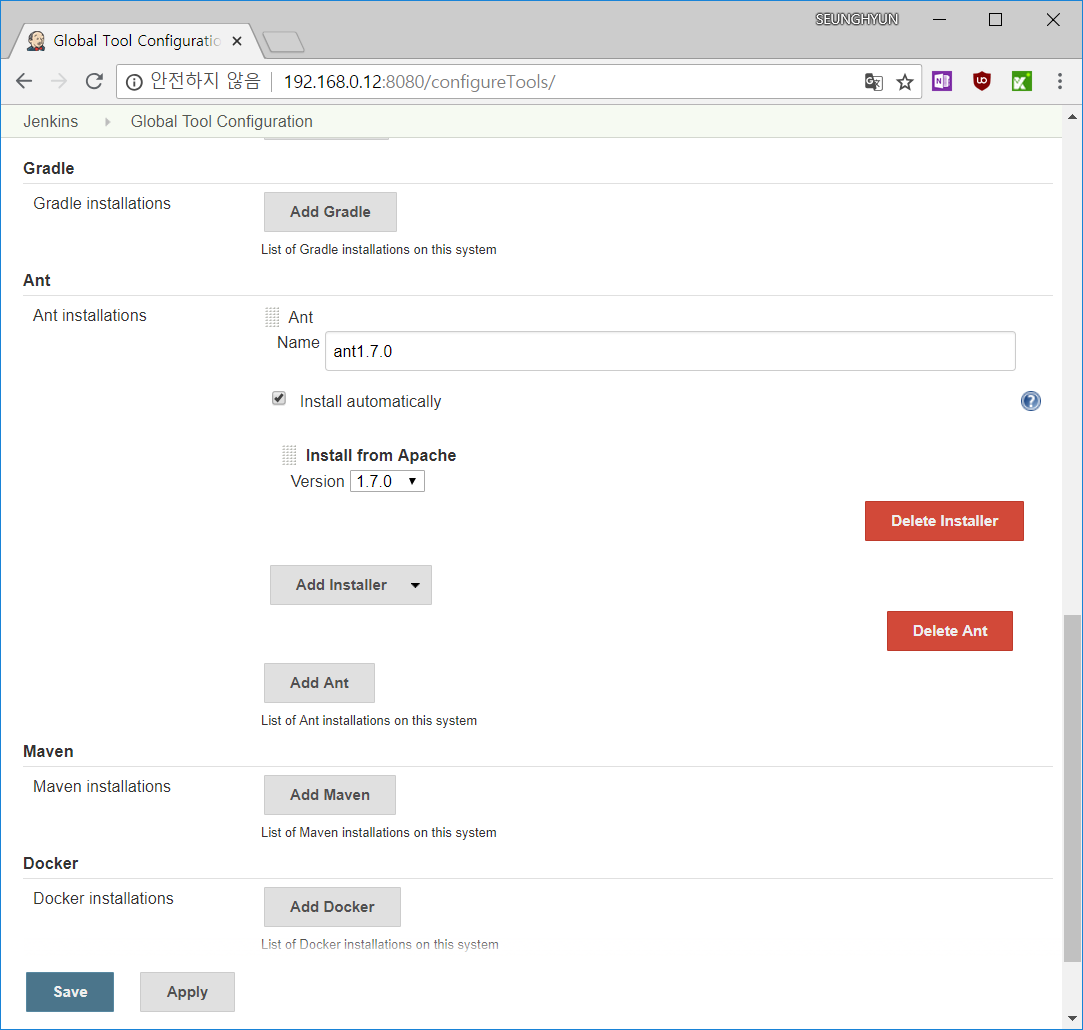
Fill in the name and select version
I select and1.7.0

2018년 7월 22일 일요일

[Automate Build] 3. Getting Started Jenkins

3. Getting Started Jenkins

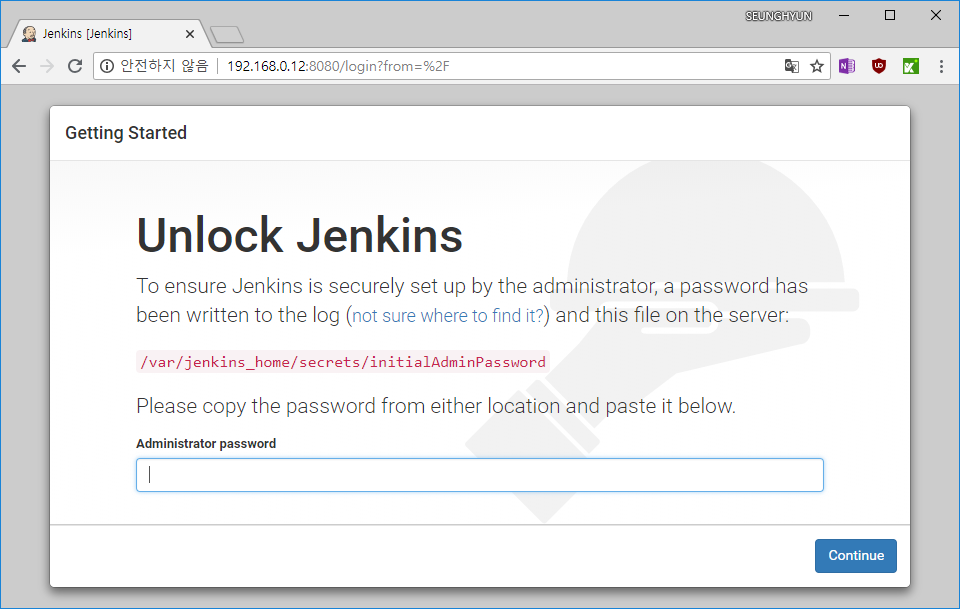
Input initial password

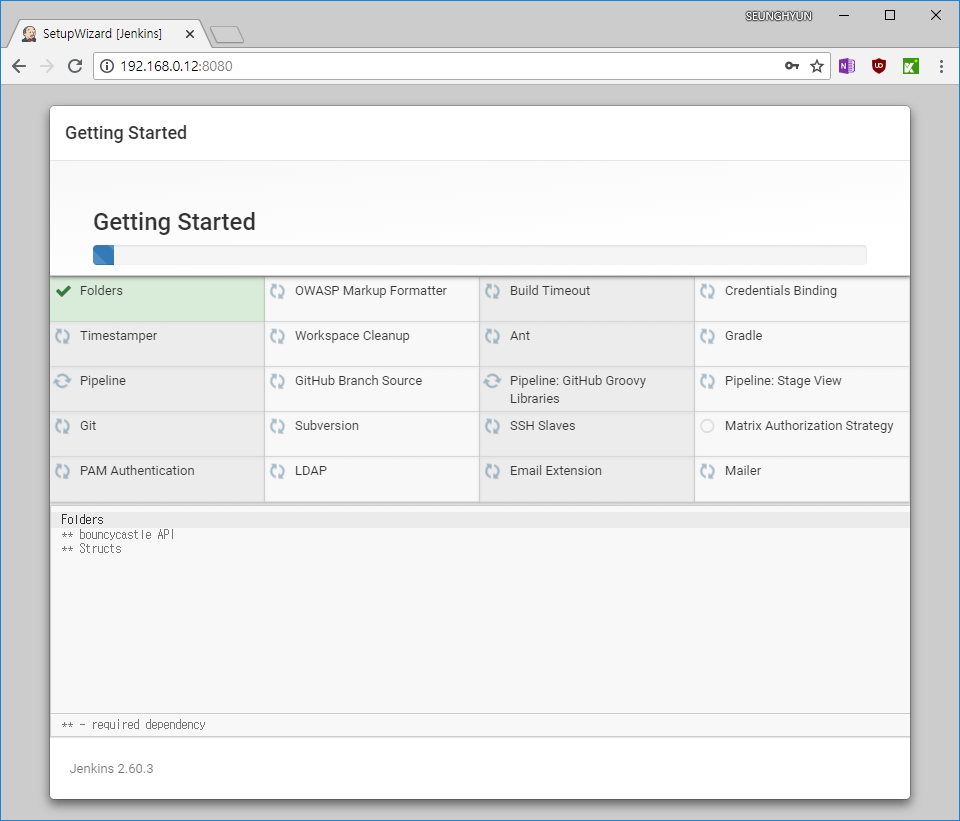
I don't know well about Jenkins, so I choose 'Install sugested plugins'

Some plugins are installing

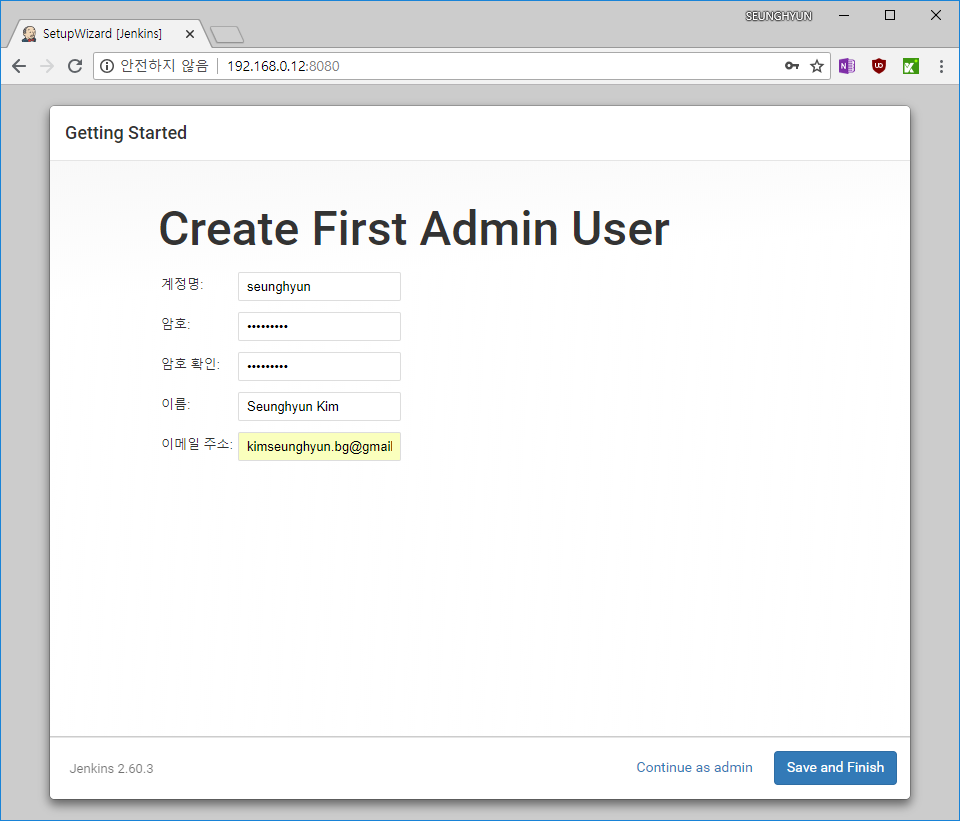
I need to make first admin user

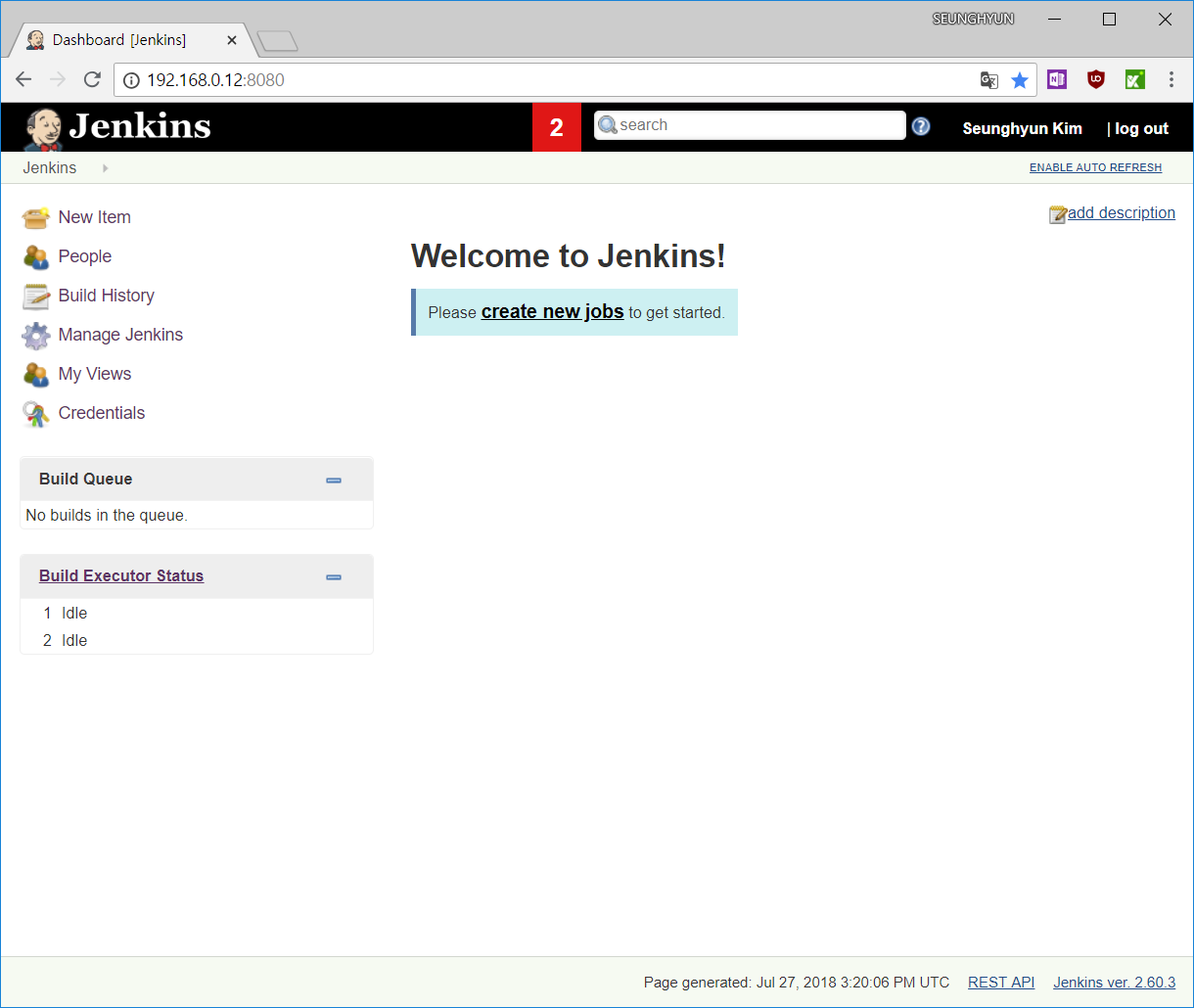
Jenkins is ready!

[Automate Build] 2. Set up Jenkins Server on Docker

2. Set up jenkins server on docker
# mkdir -p /share/docker/jenkins
# docker run -d -p 8080:8080 -v /share/docker/jenkins:/var/jenkins_home --name jenkins -u root jenkins
------ update 2018-02-26 ------
** error : I got an error. when I installed jdk 1.7 on Jenkins on the virtualBox SharedFolder(/share/).

# mkdir -p /docker/jenkins
# docker run -d -p 8080:8080 -v /docker/jenkins:/var/jenkins_home --name jenkins -u root jenkins

# docker ps
CONTAINER ID        IMAGE                      COMMAND                  CREATED              STATUS                   PORTS                               NAMES
c78da9c5ae57        jenkins                    "/bin/tini -- /usr/l…"   About a minute ago   Up About a minute        0.0.0.0:8080->8080/tcp, 50000/tcp   jenkins
a95a445b29c8        garethflowers/svn-server   "/usr/bin/svnserve -…"   14 hours ago         Up 4 minutes (healthy)   0.0.0.0:3690->3690/tcp              svn-server

Access jenkins page through browser and you need initial password
# docker exec -it jenkins cat /var/jenkins_home/secrets/initialAdminPassword
a5a62c8d573c4a5682993f0820680349

2-2.Optional
I want jenkins' workspace to be on the virtualBox SharedFolder
Make new virtualBox SharedFolder in setting.


Mount jenkins-workspace
# sudo mount -t vboxsf jenkins_workspace /docker/jenkins/workspace/

2018년 4월 29일 일요일

[Automate Build] 1. Set up SVN Server on Docker

1. Set up SVN Server on Docker
I set up svn server on docker
(SVN server in my company is on the macOS, but it's not matter.)
Install svn server and make repository
# mkdir -p /share/docker/svn-server/svn-root

# docker run --name svn-server \
           --detach \
           --volume /share/docker/svn-server/svn-root:/var/opt/svn \
           --publish 3690:3690 \
           garethflowers/svn-server

# docker ps
CONTAINER ID        IMAGE                      COMMAND                  CREATED             STATUS                           PORTS                    NAMES
a95a445b29c8        garethflowers/svn-server   "/usr/bin/svnserve -…"   3 seconds ago       Up 1 second (health: starting)   0.0.0.0:3690->3690/tcp   svn-server

# docker exec -it svn-server svnadmin create test-repo

# docker exec -it svn-server svnadmin info test-repo
Path: test-repo
UUID: 16f1dd00-4a5d-44f2-adcb-24c03d1b441e
Repository Format: 5
Compatible With Version: 1.9.0
Repository Capability: mergeinfo
Filesystem Type: fsfs
Filesystem Format: 7
FSFS Sharded: yes
FSFS Shard Size: 1000
FSFS Shards Packed: 0/0
FSFS Logical Addressing: yes
Configuration File: test-repo/db/fsfs.conf

Go to container's CLI to set config or add users
# docker exec -it svn-server sh

1-2. Add svn users
# vi /var/opt/svn/test-repo/conf/passwd
### This file is an example password file for svnserve.
...
[users]
# harry = harryssecret
# sally = sallyssecret
seunghyun = 1234567
* Caution : hot key 'shift+Q' doesn't work, use ':' + 'wq'

# vi /var/opt/svn/test-repo/conf/authz
### This file is an example authorization file for svnserve.
...
[groups]
# harry_and_sally = harry,sally
# harry_sally_and_joe = harry,sally,&joe
default = seunghyun

# [/foo/bar]
# harry = rw
# &joe = r
# * =

[/]
@default = rw

...
* Caution : hot key 'shift+Q' doesn't work, use ':' + 'wq'

# vi /var/opt/svn/test-repo/conf/svnserve.conf
### This file controls the configuration of the svnserve daemon, if you
...
[general]
anon-access = none
auth-access = write
password-db = passwd
authz-db = authz
* Caution : hot key 'shift+Q' doesn't work, use ':' + 'wq'

2018년 2월 17일 토요일

[Automate Build] 0. Introduce - current system state

I am in charge of QA  in small Data Integration Tool company since I began to work in Jan 2017. QA team's role of our company is something special. QA Team must test product's functions, performance and UI, also fix bugs, keep VCS(svn) and report product's improvements. Sometimes, we develop new function and guide operation team how to use function property.

We have two members in our QA team include me, but senior and I don't have experience about this QA role. Therefore, we had to learn about QA role ourselves. I learned product's functions and working process on qa team during the first year. In second year, I think I should introduce CD and CI if I can.

These are my tasks.
1. Test product (function, performance, UI)
2. Fix bugs
3. Develop new functions
4. Build & Release product
5. Keep VCS(subversion)


1. Test product
There is not specific test. We have only one test checklist that is thirty pages include UI, function and performance to release. It complicated three type of test. There is not unit test. We have tested everything manually. I want to make test automation. Whenever svn was committed, I have to test A to Z manually. It takes so many times.

2. Fix bugs
When bug is reported to QA team, team manager want to fix bugs in QA team.
When bug is come from new source code, team manager also want to fix bugs in QA team. I think bug reports go to man who developed this function is better than come to qa team. I can accept this. But, I want to focus on QA and make CD, CI

3. Support to create new function
Customer requires new functions. Sometimes, I find technique for new functions. I make sample code and explain to software engineer about technique that I found.

4. Build & Release product
Product build manually by Ant at eclipse. This has problems. People must make mistake. If eclipse's environments was changed to do something, building will be wrong. It occurred many time for a year. It must change to automate

5. Keep subversion
We use only trunk branch in svn. It's terrible. All codes didn't test enough to release but, they are committed to trunk. We must use branches. I will make svn's branch strategy and guild this.

[Current work flow]
1. Test


2. Commit Source Code


Most needs
1. Function Test Automation.
2. Performance Test Automation.
3. UI Test Automation.
4. Integration Test Automation.
These spend time a lot. Especially, function test is very important last gate to deploy.


Future Tools
Version Control Tool : SVN
Continuous Integration Server : Jenkins
Issue Tracking System : redmine
Build Tool : ant (hope to use gradle)
UnitTest : JUnit
UITestTool : Katalon Studio & selenium
FunctionTestTool : SoapUI
Code Coverage Tool : Not yet.